
Download IllustrateAI – Free AI-Powered Illustration Tool for Windows, Mac, Android & iOS
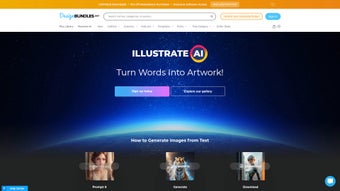
Unlock your creative potential with IllustrateAI, a powerful, web-based AI illustration tool designed for artists, designers, content creators, and hobbyists. This free software leverages cutting-edge artificial intelligence to transform simple text prompts into stunning, unique illustrations in seconds. Whether you're working on social media graphics, presentations, or digital art, IllustrateAI makes it easy to generate professional-quality visuals without advanced design skills.
Accessible from any device with a modern web browser—no installation required—this tool offers a seamless, secure, and intuitive experience. With customizable styles, instant updates, and real-time previews, IllustrateAI is redefining how creative professionals and beginners alike bring ideas to life. Say goodbye to lengthy design processes and hello to instant, AI-driven inspiration.
Generate Stunning Visuals in Seconds with AI-Powered Design
IllustrateAI stands out in the crowded world of digital design tools by combining user-friendly functionality with advanced artificial intelligence. Unlike traditional illustration software that requires hours of manual work, IllustrateAI allows users to type a simple description—such as "a futuristic cityscape with neon lights and flying cars"—and instantly receive a high-resolution, original illustration. The AI engine analyzes the prompt, interprets artistic style cues, and generates a unique visual that matches your vision. This is especially beneficial for content creators who need to produce multiple graphics quickly for blogs, social media, or marketing campaigns.
One of the key strengths of IllustrateAI is its adaptability. Whether you're aiming for a minimalist sketch, a vibrant cartoon, or a hyper-realistic render, the tool offers a wide range of artistic styles to choose from. You can also fine-tune details like color schemes, composition, and perspective.
The real-time preview feature lets you adjust your prompt and see instant changes, enabling rapid experimentation. This level of flexibility encourages creative exploration without the fear of making irreversible mistakes. Plus, since the tool is entirely web-based, you can switch between your laptop, tablet, or smartphone without losing progress.
Security is a top priority. All user data, including prompts and generated images, are processed securely and are not stored on servers after the session ends. This ensures your ideas remain private and protected. With automatic updates, you always have access to the latest features and performance improvements. Whether you're a student working on a project or a professional freelancer, IllustrateAI delivers a reliable, efficient, and creative solution that fits seamlessly into your workflow.
Seamless Access Across Devices – No Installation Required
One of the most compelling aspects of IllustrateAI is its cross-platform compatibility. As a web-based application, it runs smoothly on Windows, Mac, Android, and iOS devices—no downloads, no installations, and no system requirements to worry about. Simply open your preferred browser (Chrome, Safari, Firefox, or Edge), navigate to the IllustrateAI website, and start creating. This makes it ideal for users who work across multiple devices or need quick access to their design tools while on the go.
For professionals who travel frequently or collaborate with remote teams, this accessibility is a game-changer. You can begin sketching an idea on your iPad during a meeting, refine it on your Mac at home, and share the final version with your team via a link—all within minutes. The interface is fully responsive, meaning it automatically adjusts to fit any screen size, from desktop monitors to mobile phones. Touch-friendly controls ensure a smooth experience on tablets and smartphones, making it easy to tweak your illustrations even with a stylus or finger.
Additionally, IllustrateAI supports cloud-based saving and sharing. Once you generate an illustration, you can download it in multiple formats (PNG, JPG, SVG) or share it directly via a secure link. This is particularly useful for collaborative projects where feedback and revisions are frequent. The tool also integrates well with other creative platforms—though not through native plugins yet, the export options make it easy to import into Canva, Figma, Adobe Express, or even PowerPoint. With zero setup time and instant access, IllustrateAI removes the barriers to creativity and empowers users to generate professional visuals anytime, anywhere.
Key Features, Pros, and Cons at a Glance
- AI-Powered Image Generation – Transform text prompts into unique, high-quality illustrations instantly.
- Multiple Artistic Styles – Choose from cartoon, sketch, realistic, abstract, and more.
- Real-Time Preview & Editing – Adjust prompts and see changes instantly.
- Free to Use – No subscription fees or hidden costs.
- Secure & Private – No data storage; all processing is done on-device or in secure cloud environments.
- Multi-Platform Access – Works on Windows, Mac, Android, and iOS via web browser.
- Export in Multiple Formats – Download as PNG, JPG, or SVG for use in any project.
Pros
- Instant illustration generation with minimal input
- Intuitive, clean interface suitable for beginners and pros
- Free access with no watermarks or limitations
- High-quality outputs ideal for digital and print use
- Zero installation required – works on any device
- Regular updates with new styles and improvements
Cons
- Limited advanced editing tools compared to desktop software
- No offline mode (requires internet connection)
- AI interpretation may occasionally misread complex prompts
- No native desktop app (only web-based)
- Advanced features may require premium plans in future updates
Frequently Asked Questions (FAQ)
Is IllustrateAI really free to use?
Yes, IllustrateAI is completely free to use with no hidden fees or subscription traps. You can generate unlimited illustrations without paying a single cent. While future premium tiers may introduce advanced features, the core functionality remains accessible at no cost.
Can I use IllustrateAI on my mobile device?
Absolutely! IllustrateAI is fully optimized for mobile use. You can access it via Chrome, Safari, or any modern browser on Android and iOS devices. The responsive design ensures a smooth experience whether you're using a smartphone or tablet.
Do I need to install anything to use IllustrateAI?
No installation is required. IllustrateAI is a web-based application, so you can start using it immediately by visiting the website. Just open your browser, enter your prompt, and generate your illustration—no downloads, no setup, no clutter.
How secure is my data when using IllustrateAI?
Your privacy is protected. IllustrateAI does not store your prompts or generated images on its servers. All data is processed securely and deleted after the session ends. This ensures your creative ideas remain confidential and private.
Can I download my illustrations in high resolution?
Yes, you can download your illustrations in high-quality formats including PNG, JPG, and SVG. These files are suitable for both digital use and professional printing, making them ideal for presentations, marketing materials, and social media content.
Final Verdict: A Must-Try AI Illustration Tool for Everyone
IllustrateAI is more than just a design tool—it’s a creative companion that empowers users of all skill levels to bring their ideas to life with ease. Its combination of AI intelligence, cross-device accessibility, and a completely free model makes it one of the most compelling tools in the digital art space today. Whether you're a student, a marketer, a designer, or just someone who loves to create, IllustrateAI removes the technical barriers that often slow down the creative process.
While it may not replace full-featured desktop software like Adobe Illustrator for advanced editing, it excels in speed, simplicity, and accessibility. The ability to generate high-quality visuals in seconds with just a few words is revolutionary for content creation workflows. With regular updates and a strong focus on user privacy, IllustrateAI continues to evolve as a reliable and innovative solution.
Don’t wait to unlock your creativity. Download IllustrateAI today—it’s free, secure, and ready to use from any device with a web browser. Start creating stunning illustrations in minutes and see how AI can transform your next project.



.png)



